IRCTC Takal Ticket booking made easy.
Most of the time we got sick while booking Takal ticket. Here is the step by step approach for booking takal ticket automatically JUST 3 MINS.
Make sure you have disconnected all your skype/gtalk/yahoo/MSN and also your internet is not used by any other programs.
1. You need Firefox 8.0 or above and autofillforms – plugin installed.
2. I am assuming you have installed Firefox in your system.
3. Open this url https://addons.mozilla.org/en-US/firefox/addon/autofill-forms/
2. I am assuming you have installed Firefox in your system.
3. Open this url https://addons.mozilla.org/en-US/firefox/addon/autofill-forms/

4. Click Add to Firefox,
5. Then from the pop up, Click Allow,

6. This will download and install automatically, and then restart the Firefox browser.

7. Once you successfully installed the plugin you will see the pencil like button near to the address bar as shown below

8. Now you need to save the following information’s into a text file. (just copy the entire text and save it in a text file using Notepad). Assuming you have saved as (my_irctcprofile.txt)
9. Just click the Autofillform and choose settings.
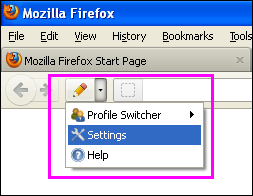
10. From the AutoFill form settings window , Choose Profiles tab

11. Then click the Import profile button and choose the file where you saved the above information and click open.

12. Then Navigate to Simple tab and change the user id and password , passenger name, sex, age, and From and To station.

13. Then open www.irctc.co.in and press Alt + J to fill username and
password automatically and click ok.
14. Then navigate the cursor to Plan My travel and again press Alt + J and
click Find trains, and book immediately.

Hi,
ReplyDeleteI did upto step 11, but i can't able to see the step 12 as per the screenshot. I saved the file as it is.
Please help.
Thanks
Kamatchi Saravanan
After that click the Simple tab. and choose www.irctc.co.in from the drop down menu if it is not already selected.
ReplyDeleteI can able to see the default profile in the drop down.
ReplyDeletei think you haven't import the file properly. please repeat the step 11, again.
ReplyDelete